GitHub - yourtablecloth/macSandbox: Windows Sandbox for macOS
Key Points
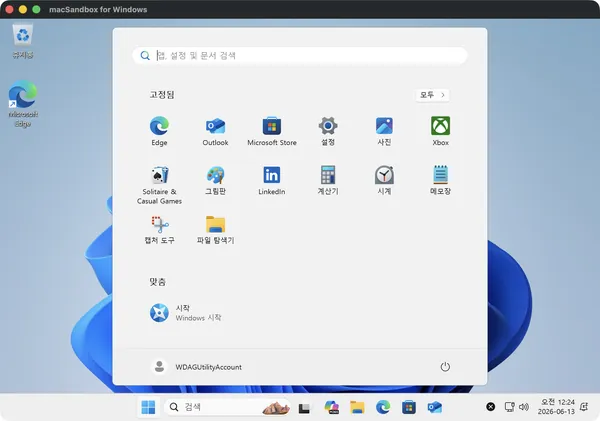
- 1macSandbox for Windows offers a disposable Windows 11 ARM64 sandbox environment for Apple Silicon Macs, designed to mimic the Windows Sandbox experience.
- 2It leverages QEMU with Hypervisor.framework for virtualization and an in-app RDP view for interaction, supporting features like copy-on-write sessions, shared folders, clipboard redirection, and .wsb configuration compatibility.
- 3The application requires macOS 14+ and a user-provided Windows 11 ARM64 ISO, and it is dual-licensed under GNU AGPL-3.0-or-later and a commercial license.
macSandbox is a software project designed to provide a disposable Windows 11 ARM64 sandbox environment for Apple Silicon Macs, emulating the functionality of the Windows Sandbox feature on macOS. The core principle is disposability, where each session operates on a copy-on-write overlay, ensuring all changes are discarded upon exit, reverting to a pristine state.
The runtime environment leverages a combination of virtualization and display technologies. For virtualization, it employs QEMU in conjunction with Apple's Hypervisor.framework (HVF), which enables efficient hardware-assisted virtualization on Apple Silicon. Display and user interaction are managed through an in-app embedded Remote Desktop Protocol (RDP) view, utilizing the libfreerdp library. This integrated RDP client handles dynamic resolution scaling, HiDPI (Retina) support, trackpad scrolling, and pinch-to-zoom gestures. It also facilitates essential redirection capabilities, including bidirectional clipboard sharing (text and files), shared folders (auto-mounted as within the guest OS), printer redirection via CUPS, and audio playback/microphone access.
The initial setup involves a one-time, unattended baseline image build process. This deterministic build is initiated from a user-provided Windows 11 ARM64 ISO. The methodology relies on a fully automated Windows Preinstallation Environment (WinPE) and Deployment Image Servicing and Management (DISM) process. This build injects necessary virtio drivers for optimal performance, disables the Edge first-run experience, and removes certain inbox bloatware to create a lean base image. The application also incorporates a license-aware mechanism, confirming Windows licensing prerequisites before the base image construction.
macSandbox supports compatibility with Windows Sandbox's .wsb configuration files, allowing users to define sandbox parameters such as memory allocation (--memory), CPU core count (--cpus), folder sharing (--folder <host_path>:<guest_path>[:ro]), and initial logon commands (--logon "notepad"). The project offers a localized user interface and keyboard layouts, including Korean and Japanese.
Technically, QEMU runs as a separate process, and the project adheres to its licensing requirements by preventing in-process linking. The software is dual-licensed under GNU AGPL-3.0-or-later and a commercial license, with bundled third-party components retaining their original licenses. Users are required to provide their own Windows 11 ARM64 ISO and possess a valid license for each Windows instance run.