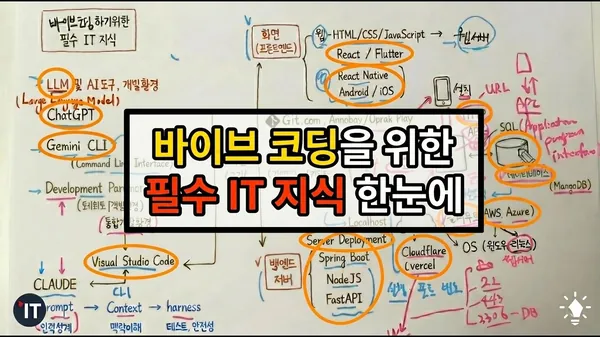
Clear Any Hurdles in Vibe Coding | A Must-Watch for Beginners Before You Start
Key Points
- 1The video introduces essential AI coding tools like ChatGPT, Gemini, Cursor, and Claude, highlighting their integration with development environments like VS Code and the importance of CLI for efficient AI-assisted development.
- 2It then details fundamental programming concepts, including various source code languages (Java, Python, JavaScript), the role of version control systems like Git/GitHub, and the distinction between frontend (web/mobile frameworks) and backend (server-side frameworks) development.
- 3Finally, the discussion extends to application deployment methods such as CICD and services like Cloudflare/Vercel, explaining server interaction via ports and HTTP, the use of APIs for data exchange, and the significance of databases (e.g., MySQL) for data storage and management.
The paper, presented as a YouTube video transcript by Alex from Gislot, discusses the essential IT knowledge required for AI-assisted coding, termed "VIBE Coding." It emphasizes that despite the increasing capabilities of AI, foundational understanding of IT concepts remains crucial for effective development.
The presentation begins by introducing Large Language Models (LLMs) such as ChatGPT and Gemini as the core AI technologies. It then details specialized AI tools for development:
- Gemini CLI: A Command Line Interface for interacting with Gemini, highlighting the concept of CLI as a text-based interface for executing commands (e.g.,
CMDon Windows). - Cursor AI: Presented as an Integrated Development Environment (IDE) with built-in AI functionalities. An IDE is explained as a unified environment for software development, encompassing a source code editor, build automation, and debugger.
- Claude AI: This AI tool can be integrated into existing IDEs like Visual Studio Code (VS Code) as an extension or module, allowing developers to leverage AI within their familiar environment.
The discussion then delves into the evolution of AI interaction methodologies:
- Initially, the focus was on structured
prompts(systematic questions) for effective AI utilization. - This evolved to providing
context, where the entire situational background is conveyed to the AI for more informed decision-making. - More advanced approaches, particularly with Claude, involve
harnessesand the use of multipleagentsto perform specialized tasks such as testing or ensuring code safety.
The paper proceeds to outline the typical software development workflow, emphasizing concepts relevant even when AI assists:
- Source Code: The fundamental output of development, written in various programming languages (e.g., Java, Python, JavaScript, HTML).
- Compilation/Build: The process of converting source code into executable forms. "Build" specifically refers to creating a complete, runnable package that may include libraries and environmental configurations.
- Version Control:
GitandGitHubare introduced as essential tools for managing source code. GitHub serves as a platform for project hosting and collaboration, necessitating understanding of Git commands for pushing and pulling code.
Critical concepts related to application deployment and infrastructure are then covered:
- Application Types:
- Frontend: Deals with the user interface (UI) and user experience. Examples include web development (HTML, CSS, JavaScript, running on web servers) and mobile app development (frameworks like React, Flutter, React Native, or native Android/iOS development). Frontend applications are deployed to app stores (Google Play, Apple App Store) or web servers.
- Backend: Involves server-side logic and data management. Frameworks like Spring Boot, Node.js, and FastAPI are mentioned. Backend programs run on servers.
- Ports: A fundamental networking concept. Server programs "listen" on specific numerical ports (e.g., 80 for HTTP, 443 for HTTPS, 22 for SSH, 3306 for MySQL) to identify and distinguish services.
Localhostrefers to the current machine for local development. - Server Deployment: Actual server programs are deployed to remote servers, often in cloud environments (e.g., AWS, Azure). The concept of CI/CD (Continuous Integration/Continuous Delivery) is briefly mentioned as an automated deployment process common in team or company settings.
- Deployment Services: Cloudflare and Vercel are presented as simplified deployment services that abstract away server management, allowing developers to deploy by simply providing source code and receiving a live URL. For more robust or complex setups, direct cloud service usage (AWS, Azure) is recommended, often involving Linux as the server OS.
- Protocols and APIs:
- HTTP (Hypertext Transfer Protocol): The standard protocol for web communication, enabling browsers to request and receive web pages.
- API (Application Programming Interface): Defined as an interface provided by an application for other applications to interact with it, typically for data exchange. APIs are characterized by HTTP methods (e.g.,
GETfor fetching,POSTfor sending,PUTfor updating,DELETEfor removing) and specific URLs. API responses are most commonly formatted in JSON (JavaScript Object Notation).
- Database: Essential for persistent data storage (e.g., user management, posts). MySQL and MongoDB are cited as common database systems. Interactions with relational databases often involve SQL (Structured Query Language) for querying and manipulating data.
In summary, the paper provides a foundational overview of key IT concepts and tools indispensable for developers, even when leveraging AI for code generation. It covers AI development environments, source code management, application architecture (frontend/backend), deployment strategies, networking basics (ports, protocols), and data management (databases, APIs).