Config 2026: New Materials, New Tools and a More Expressive Canvas | Figma Blog
Key Points
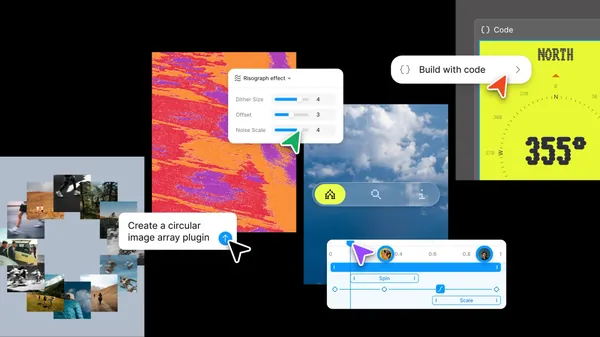
- 1Figma’s Config 2026 update introduces new creative tools directly on the canvas, including code layers, native motion timelines, and customizable shader effects to streamline the design process.
- 2The platform now supports generative plugins and Weave tools, enabling users to build and share complex, node-based workflows without requiring deep development expertise.
- 3An enhanced Figma agent, now equipped with specialized skills, connectors, and team-visible chats, acts as an integrated assistant to help designers iterate faster and connect with external software stacks.
Config 2026 marks a paradigm shift in Figma’s platform, transitioning from a static design environment to an expressive, code-integrated, and generative-ready canvas. The core philosophy driving these updates is the removal of the traditional "design versus code" dichotomy, treating code as a fundamental design material alongside vectors and bitmaps.
Core Methodologies and Technical Innovations
1. Code Layers
Figma has introduced code layers that exist directly on the canvas, enabling designers to treat code as an iterative material. By leveraging a single-click conversion from design frames to interactive code layers, users can perform side-by-side explorations. The system maintains a bi-directional synchronization, where extracting design frames into editable layers allows for seamless updates between visual design and the underlying code structure.
2. Figma Motion
The introduction of a native timeline brings temporal expression to the canvas. Technically, this implementation integrates keyframes, easing curves, and presets directly into the design system. Motion acts as a foundational element of the component architecture, allowing animations to be reused globally. For engineering handoff, Dev Mode provides direct inspectability of animation logic, exporting to CSS, JSON, or React, and ensuring compatibility with Model Context Protocol (MCP) for programmatic integration with coding agents.
3. Shader Fills and Effects
Shaders are exposed as first-class, parameterized entities. The system allows users to generate shaders via the Figma agent using natural language or reference images. These shaders function as either fills or effects, automatically exposed as stackable parameters on the canvas. This allows for complex, real-time procedural rendering without requiring deep knowledge of GLSL or external graphics programming, though the underlying engine remains high-performance.
4. Generative Plugins and Weave Tools
Figma has democratized tool-building by removing the requirement for local development environments or specific Plugin API knowledge. Users can synthesize custom tools by describing behavior and control parameters, which the agent then constructs natively. This is complemented by the integration of Weave tools, a node-based architecture for managing generative workflows. Weave allows for the concatenation of models and assets, defined by a directed graph structure where outputs of one node (e.g., ) serve as inputs for the next transformation node ():
This allows for the creation of reusable, inspectable procedural processes.
5. Figma Agent and Contextual Intelligence
The Figma agent has evolved into a context-aware assistant that integrates with external toolchains (Notion, Slack, GitHub, etc.) via connectors. It operates on three distinct pillars:
- Skills: Reusable, codified workflows that provide the agent with consistent procedural instructions.
- Contextual Connectors: Interfaces that bridge the canvas with external data stores.
- Shared State: Agent-driven interactions are visible by default to teammates, enabling collaborative AI-augmented design iterations, where the agent’s chat history acts as a live documentation of the creative process.